
Looking to dive into Desktop Linux?
A Guide to Desktop Linux in 2025, available for purchase as an eBook and in Print, is just the handbook you need to orient you on this journey.
Whether you're worried Windows no longer has your best interests at heart, or you're just plain curious, this guide will help you get up and running while avoiding all of the usual potholes and footguns along the way.
If you tried Linux a long time ago, you'll be glad to know all aspects of the desktop have only gotten better over time. You might not even recognise it!
It's not 1998 anymore. It's been over 30 years since Linux was first released, and the Linux Desktop has undergone seismic shifts in usability and capability over the years. This book is designed for the modern age and helps you take advantage of all the latest technology available for desktop Linux. Even if you've used Linux before, things have changed a lot in just the last few years.
That's not to say the Linux Desktop isn't as quirky as it has ever been, but the jankiness has been sanded off in many areas. There's plenty you can do on Linux, and yet it would be a lie to say there isn't a cost to that freedom most of your penguin friends aren't forthcoming about. This guide acknowledges the limitations of the Linux world and doesn't try to hide them from you.
In this book, you'll find chapters about:
- getting your new Linux distribution setup on your computer
- providing step-by-step guidance for installation, software compatibility,
- gaming, and productivity
- exploring the history of desktop Linux
- the bright yet uncertain future of Linux
Buy this book now and dip your toes into the weird and wonderful world of Desktop Linux. Just don’t blame me when your house starts filling up with penguin plushies and red hats.
This article was written by James North and is made available under a Creative Commons Attribution-NonCommercial 4.0 International License. Share it and build on it, but don't exploit it for commercial purposes.
Read the legalcode for the full terms.
Table of Contents
I’m sure most of us are familiar with Google and plenty of us have “Googled” something before. Years ago, I Googled stuff every day. If you’re anything like I was back then, you’ve never thought much about what Google really is. It wasn't until I started thinking about the software and services I used every day on my computers that this changed.
What is Google, really?
Google is a search engine that helps you find the stuff you’re looking for—or at least, that was what it used to be. For years now, Google has been in the business of steering you toward particular webpages for the sake of profit. Unfortunately, what is profitable for Google does not necessarily line up with what you want out of a search.
It’s rare that Google’s search result pages don’t start with at least a few sponsored results that advertisers are paying for you to see. In principle, advertising can be a good thing. Much like search engines, advertisements help people learn about new things they might find useful and pay for a company’s product they are satisfied with—everybody wins.
That’s not always the case. Google's management of their ad network leaves much to be desired. There have been many news stories about advertisers using Google Ads to scam people. The most recent scam I’ve read about is directed at advertisers themselves, but usually they target unwitting searchers. Keep in mind, there are up to 4 sponsored results on each page; there’s a chance one of them is a phishing scam or outright malware—and this is before we even get into the quality of a product being advertised. If you’re savvy, you quickly learn that the easiest way to work around this flaw in Google’s search is by ignoring ads altogether and scrolling past them.
Advertisements almost always operate on a “push” model; the user sees an advertisement that is pushed onto them whether they want to or not. It’s rare for a user to seek out an advertisement. Search engines like Google seem to operate on a “pull” model, where people seek out results and try to pull them out of a search engine.
In response, Google pushes advertisements at you first and retrieves results afterward. But before it pushes advertisements at you, it often pushes answers on you that are designed to keep you on Google’s services instead of steering you to another site. The longer you’re on Google, the more ads you’re likely to see, and the more money Google can make. Plus, you might use another of Google’s other services and end up paying them money for something.
The answers at the top are rarely particularly useful, and in 2025, they're often outright false. This is another flaw in Google’s result pages you need to work around by scrolling straight past as well.
Really, Google is pushing lots of profitable information at you and making it harder for you to pull out useful information.
I’m not a fan of this approach. For Google, good results are way down on the priority list. It makes Google a bad product, in my opinion. I wanted something different. There are a lot of search engines out there, and I've tried most of them. In this post, I'm going to talk about the two search engines I stuck with for the longest. First, I want to talk about Kagi.
I've been using Kagi for the last few years because it does a lot different—for the better.
The big difference is that Kagi is a paid subscription service—you pay for the product. Traditionally, search engines have made money with ads (and Google makes a lot of money from ads), but the problem with this model is that Google is designed around their business customers, not the people who search with Google. The seeker’s experience only needs to be not terrible enough that they don’t want to switch to a search engine (or even know alternatives exist).
How far can Google go before users have had enough? How much value can they extract out of you by making your experience worse? That’s the question Google is always asking.
Kagi doesn’t ask that question. Kagi only has a single customer, and that’s the person who uses the search engine to find something. They ask, “how can I make the experience better so users will stick with the service?” That's why using Kagi is a nice experience. You can open feature requests and leave criticism on the kagifeedback site and you can actually talk to the people who work there—including the CEO.
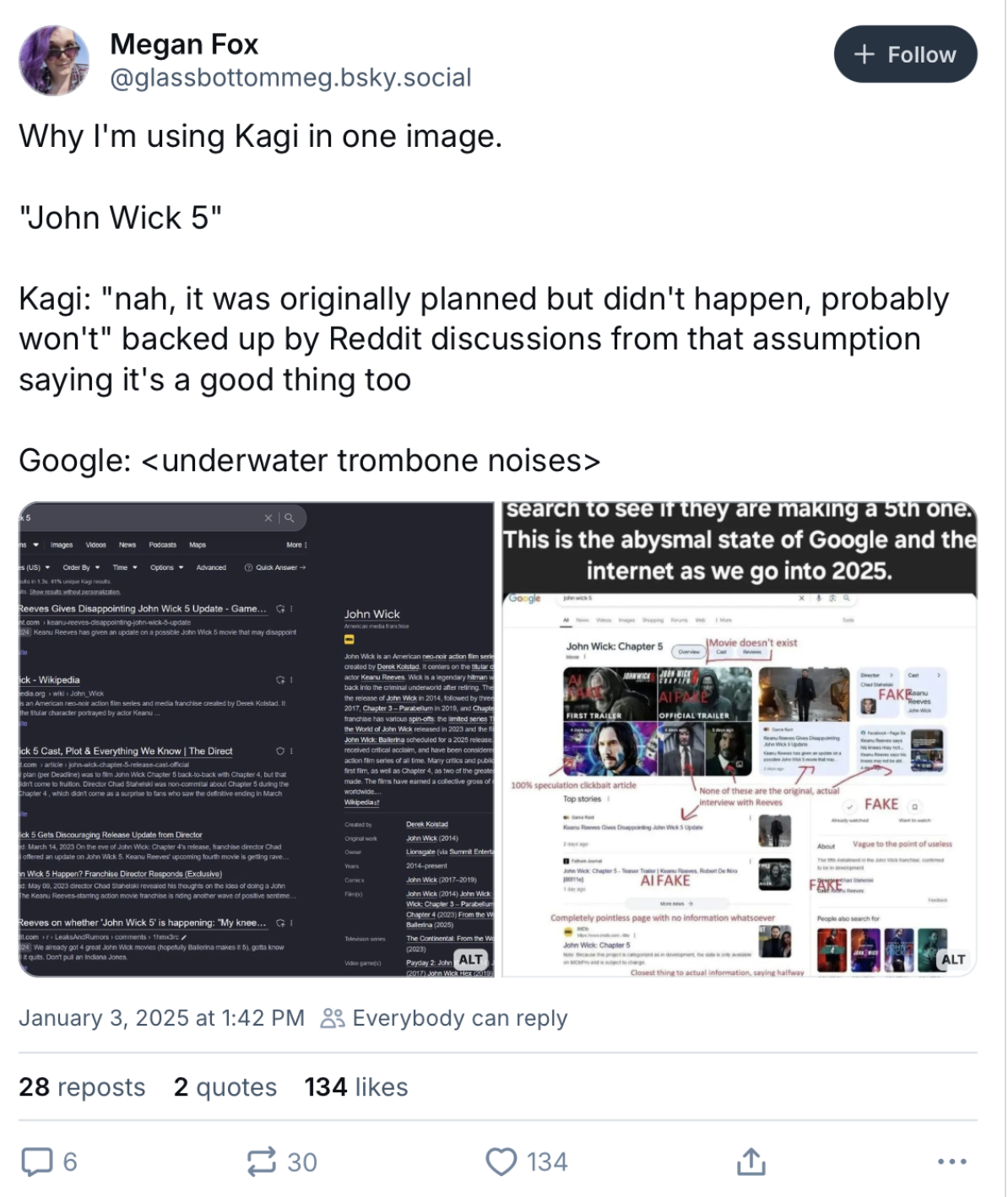
Great Results, No Ads
Kagi has great results; often better than Google. There are no advertisers to worry about at all; Kagi’s top priority is serving up great results so you keep paying them for the service. This approach has certainly worked on me. I’ve been a paying Kagi customer for almost 3 years.
I am not constantly working around the product. It’s a product designed and optimised for me, and it’s a smooth and enjoyable experience. I waste less time and find useful stuff I may not have otherwise found.
One thing I like about Kagi is that it surfaces results from the Internet Archive; even pages that have gone dark decades ago can still be found in Kagi’s Blast From The Past result section with information that might still be useful. I’ve found some amazing stuff with this feature, and it’s something I wish other search engines had.
But Kagi in general surfaces higher-quality pages from smaller websites, which is the focus of its Teclis index.1 Teclis is the window to the “Small Web”. It looks for less-crawled pages that have less than 5 trackers or ads. Seeing these results mixed in with the results from bigger websites you’d expect adds a lot more depth to the results page.
No Junk
There are no junk results at the top of every Kagi result page. There is no “knowledge panel” that feeds you misleading or outright incorrect information, or other attempts to keep you from clicking on someone else’s site. Kagi’s goal is to get you where you’re going fast because every search you make costs them money. This is the right incentive, because it’s aligned with your goals.
But that doesn’t mean Kagi doesn’t have useful widgets at the top, because they do. If you want to convert metric to imperial units, you can do that. If you want to convert USD to AUD, you can do that. If you want to summarise all the results on the page using an LLM, then you can do that if you explicitly ask for it by adding a question mark to the end of your query. It doesn’t push AI results on you; you need to pull them out. If you use bangs a lot, Kagi has plenty of those.
Kagi has cut the junk and kept the useful stuff, and kept innovating with new features. Kagi recently started tagging certain image results as AI generated, allowing you to filter them out if you don’t want to see them. While Kagi does offer AI features like Kagi Assistant, Quick Answer summaries, and Universal Summarizer, you don't ever need to see them if you don't want to. I think the Quick Answers are counterproductve at best, find next to zero value in the Kagi Assistant product (certainly not enough at that eye-watering price point), but think Universal Summarizer can be handy in some situations, so I use it.
Kagi was originally founded as an AI company years before ChatGPT came into the mainstream. There are a lot of split opinions on generative AI, and people on both sides of the spectrum say a lot of reasonable stuff. Personally, I think generative AI brings out the worst in tech (much like cryptocurrency), but I don't think it's all bad. There are some legitimately good use cases for generative AI. Kagi is optimistic about generative AI, but they know not everyone will be, so they don't push it on users. I think this is a good approach, but we'll see where AI ends up in a few years.
Note that when I say "AI", I'm referring to Large Language Models (LLMs).
That being said, I find it somewhat hypocritical to say a Kagi search results in the least CO2 emissions between its competitors while discounting the CO2 emissions that go into providing the APIs Kagi contacts for a query and integrating a lot of generative AI features; AI is notoriously bad for the environment. It's still nothing compared to the insane amount of power Google and Bing are using on AI which is automatically activated on every applicable search. This is opposed to Kagi, where AI features are explicitly opted into by the user. It's the user's choice what AI features they use, and Kagi intends to stick with that philosophy. It's something to keep in mind.
This is in direct contrast to Mojeek, a search engine I'll talk about shortly.
Kagi is built for you—don’t like something? Change it!
That’s another thing that’s great about Kagi. If you don’t like something, you can easily change it. If you don’t want to see pinterest results, just add it to your block list. If you’re sick of seeing reddit results at the top, lower their ranking so independent sites surface first. If you always want to see a certain site at the top of your results, pin it.
Personally, I don’t use this feature a lot except to lower the priority of big corporate sites in most cases because I’m more interested in smaller sites. You could end up in a “search bubble” if you prioritised only the sites you know you want to see already, but that’s your choice. It’s a powerful tool, but it’s also something to be careful with.
If you’re curious what domains Kagi users are altering rankings for, you can see that here: https://kagi.com/stats?stat=leaderboard
You can also change the appearance of the search engine. Move the URL above or below the result title, add or remove favicons, even move the position of the results. If you don’t like the options it already gives you, you can use a custom theme.
If you don’t want search suggestions (I don’t), turn them off! Want to add your own bangs? Go ahead!
Want to see a thumbnail from a random point in the video instead of the uploader’s chosen thumbnail? You can do that.
There’s plenty of opportunity for customising the experience to your liking. Google doesn’t compare. I don’t use a lot of the customisation features, but a few of them are handy. I’m sure someone will have way more fun with it than I do.
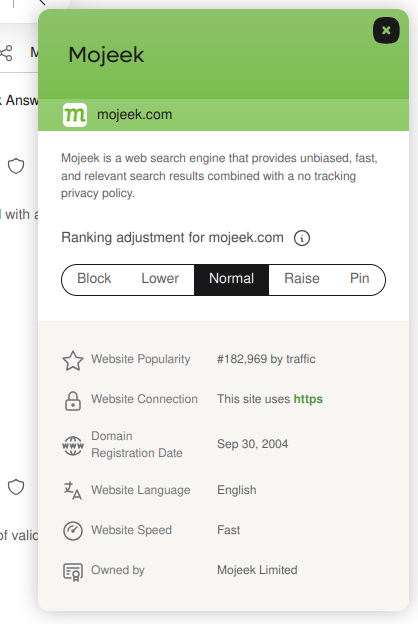
Handy Site Info
Kagi will pop up information about websites in the results when you click the shield; stuff like how many ads and trackers it has, its traffic ranking, when the domain was registered, and who owns it. It even shows you whether the page requires a subscription to see (e.g. news sites). The last feature is usually the most useful.
This is handy information to have, and helps you decide whether you really want to click on a link before you do. I began wondering why other search engines didn’t have this kind of information before I remembered it would be working against Google’s interests to have users think twice about their sponsored links.
No Javascript Required
This is a criterion few search engines meet. Kagi works perfectly fine without Javascript, which I have disabled in my browser by default. It’s as simple as that. I can’t say the same for Google or Bing.
Why I don't like Kagi
While I like everything about Kagi’s business model, there are some business realities I don’t care for. That’s why it’s not my default search engine.
Kagi is ultimately a metasearch engine that relies primarily on Google, but also sources results from Mojeek. It uses paid APIs to get results for every search you make. So, when you make a search with Kagi, Google gets some of that money. Kagi doesn’t just serve up Google results, though; it ranks them together with the results it gets from other indexes like Mojeek, Teclis, and Tinygem, and so you end up with better results than Google most of the time.
Kagi also has a partnership with Yandex, the Russian search engine. This is a point of contention for many people (including me). I dislike that my money is going toward Yandex and Google. Hell, Kagi is even hosted on Google Cloud Platform. They don’t have their own servers. Unfortunately, that isn’t unique. Most “alternative” search engines rely on Bing, and Kagi does too, but it’s way different to what Duckduckgo is doing. Most of them are just proxies, but Kagi is creating something new by remixing the results. Searx, the free software metasearch engine, does this too, but the results and the experience aren’t as great. I might setup a SearXNG instance one day anyway.
The fact is, Google and Bing do provide good results through their APIs. Their indexes are huge; bigger than anyone else’s. That’s why Kagi uses them. Developing a good search engine is hard. Really hard. And while I do think Kagi makes better use of their indexes than they do… it also makes Kagi dependent on them.
Why Mojeek is my default search engine
No one knows that better than Mojeek, which has been my default search engine for almost 5 years. They’ve been around for more than 20 years, and they have the third biggest index after Google and Bing. Unlike most “alternative” search engines, they actually do have their own index.
Take a look at SearchEngineMap if you want to see these dependencies in action.
Mojeek is an actual alternative with its own realities. The company and the people working there are great, and the community is great too.
It’s awesome that the entire results page works without Javascript, and they’ve expressed keeping it this way is important to them. I’m on board with the idea of keeping search accessible to everyone by not charging users. When they say “ads are not the fundamental problem. The fundamental problem is tracking,” I believe them. Mojeek Focus is also very cool. And the focus on privacy is important to me! I’m assured that none of my money is going to Google, Bing, or other companies that profiteer from their user’s data or engage in any other unsavory activity because Mojeek does everything themselves. They run and maintain their own physical servers which they colocate at the UK’s greenest datacenter, Custodian. Mojeek works very hard to keep their impact on the environment minimal (and because they control all of their own infrastructure, that is actually within their power), but they do integrate a small amount of AI for search summaries which is opt-in.
Mojeek has a culture of doing what’s right, even if it’s hard. They’re in a really tough industry, but they refuse to take any shortcuts. They certainly aren’t running a Discord group for their community and putting their community members' privacy in the hands of a company that doesn’t seem worthy of that trust2; they take responsibility by running their own Discourse instance on their own servers. Their independence is what I respect most about the company.
But it’s 50-50 whether the results will be any good.
While Mojeek’s index spans more than 8 billion pages, there are still pages I reach for that aren’t in the index. Mojeek only supports a few languages, which doesn’t include Japanese. I often want to find something in Japanese, which means I can’t use Mojeek for that. They want to expand to other languages eventually, so I’m looking forward to that. It's getting better slowly.
I can live with Mojeek, but the results aren't great yet. When I can’t find something with Mojeek, I’ll search Kagi and sure enough, I’ll quickly find what I’m looking for. Firefox's one-time search feature makes it really easy to manage multiple search engines, and it's something I use all the time.

While I think Kagi is a great search experience—the greatest search experience today, in fact—I’m hoping Mojeek will succeed. They’ve taken the long, hard road to building a private and independent search engine and I really believe in what they’re doing. So I’ve made Mojeek the default search engine on all my devices.
If you're interested in trying out an alternative search engine, you can give Mojeek a shot for yourself here:
More on Search
I highly recommend Seirdy’s incredibly detailed comparison of every search engine known to their webserver logs if you want to learn more about search: https://seirdy.one/posts/2021/03/10/search-engines-with-own-indexes/
It’s a wide world out there on the web.
-
An “index” is a collection of webpages a search engine looks through to return results to you.↩︎
-
Yes, this is a jab at Kagi’s Discord “server”. I’m not a fan of this approach. I dislike it with FOSS projects, but Kagi is promoted as a privacy-friendly search engine. Their community spaces should be privacy-respecting too. While all messages are public in the community regardless, it's possible to send pseudononymous messages, meaning they aren't tied to your real world identity like your email address. Discord knows your email address and phone number, and it can associate your messages with you for profit. Even if you don't send any messages, the fact that you're in this Discord group looking at messages is information that can be used against you.
I would feel far more comfortable trusting only Kagi and Mojeek with my real-world identity. Not every comment I make is something I want personally associated with me. The fact that Discord messages cannot be indexed by search engines is an additional factor I dislike. ↩︎
Written by
James North
Project Manager and Company Director at Evolvepreneur.
Part-time system administrator for Evolve Systems Group.
Part-time writer and author of A Guide to Desktop Linux in 2025.
Symfony developer.
You Might Also Like
How to create professional audiobook .m4b files in under a minute using your WEB BROWSER!

James North
May 31, 2026




Comments (0)
No comments yet. Be the first to comment!